Blog
Client-Server Model: How Requests Travel

Michael BestMan
Posted: July 23, 2025 • 5 min read

Client-Server Model: How Requests Travel
Humans communicate, and so do every device connected to the internet. Communication breaks down if both the sender and receiver cannot comprehend each other. In the digital world, the same rules apply: devices in a network must have a common, mutual language. The result of whatever we do with these devices comes from the exact same place: effective communication between a client and server. In this content, we will dig into the client-server model, highlighting how this interaction is fundamental to building secure systems and defending against cyber threats.
Understanding Client-Server Model?
- Clients are devices that can help end users access services and information available on a server. By requesting data or resources from a server, it initiates communication. Mobile apps or web browsers like Mozilla Firefox, Google Chrome are examples of client applications.
- Servers, on the other hand, listen for these requests. As the name implies, it serves. That is, they provide clients with the requested data, resources, programs, or even services over a network. Some examples are web servers, file servers, DNS servers, and so on.
In understanding this, the client-server model is the architecture upon which tasks or workloads between servers and clients are distributed. By model, we mean a blueprint that defines how these systems interact or should operate to effectively communicate.
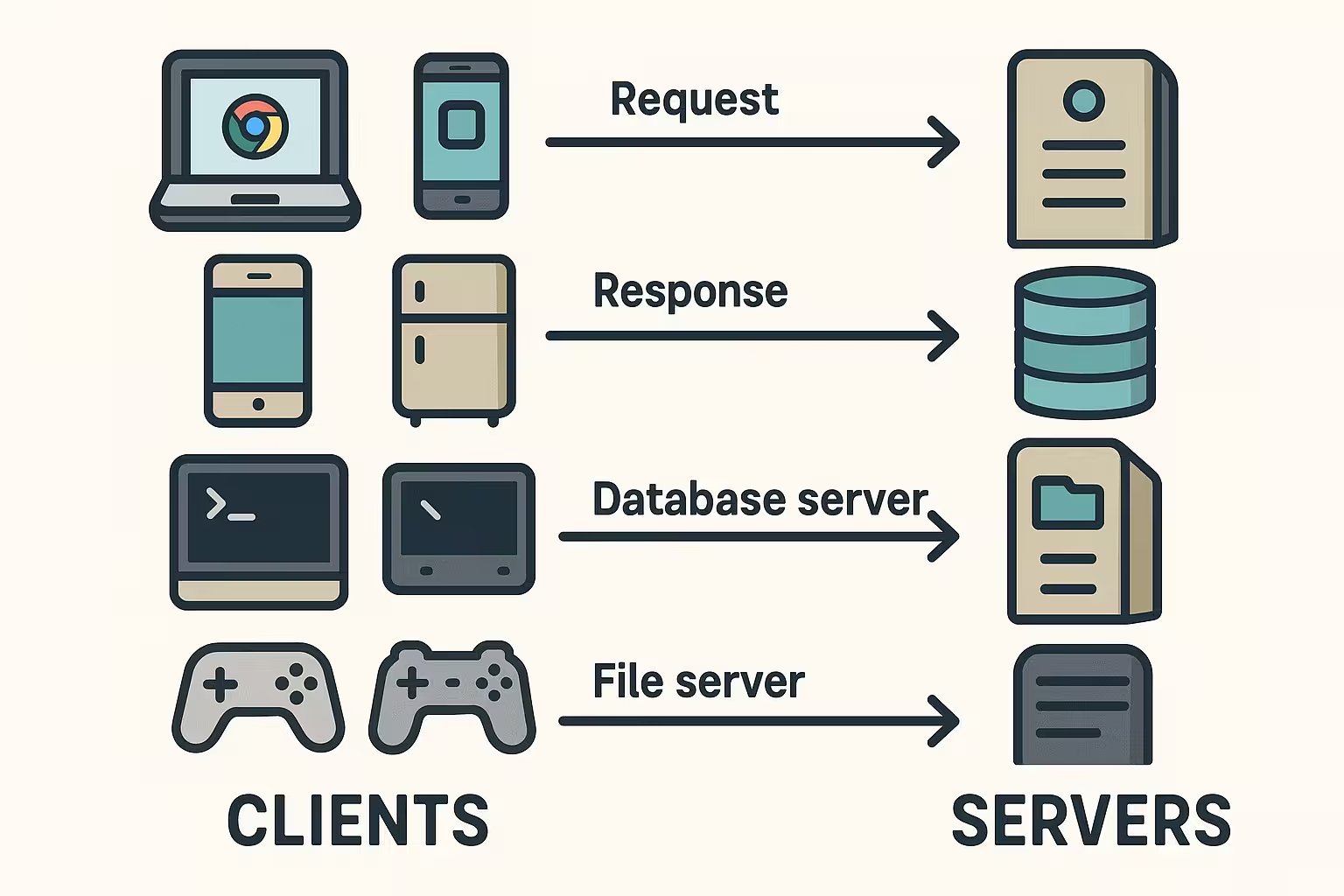
Request-Response Lifecycle
In our previous post on how the URL works, we highlighted how the request-response lifecycle works after a successful connection is established between a server and a client. However, this can also be simulated using the browser's developer tools.
To do this, Find the Network Tab in the Web Browser.
- Open any browser of your choice.
- Find the More Tools menu
- Enter the developer tools (alternatively, press F12 or right click and find 'inspect').
- Navigate to the Network Tab, then type the domain name (www.reinventsecurity.org) into your browser.
- The results are the requests and responses exchanged.
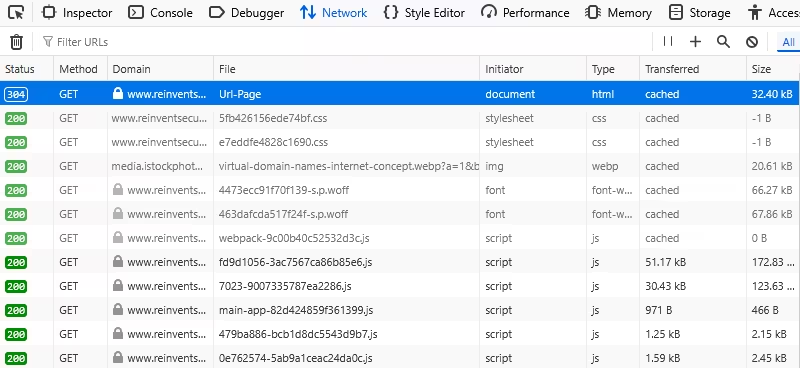
- HTTP Request: This is the way clients communicate with servers on the internet, in the form of headers.
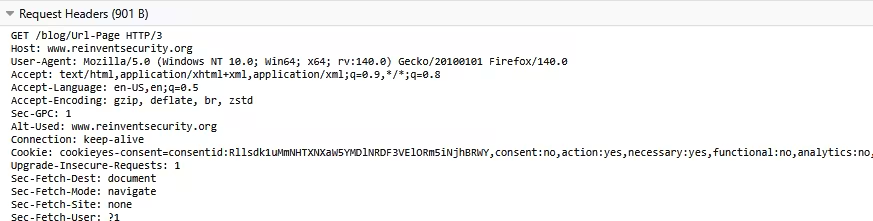 From the above, a typical HTTP request has the following:
- Request Method:This specifies what the client wants to do. They are sometimes called HTTP verbs. 'GET', for instance, means to retrieve data from the server. Other methods are:
POST - used to send data
PUT - used to update data
DELETE - used to remove data.
Additional Tips: You can read more about HTTP Request Methods here.
- URL: (Uniform Resource Locator): Tells where the resources are located (e.g., /blog/Url-Page)
- HTTP/3: This explains the version of protocol used.
- HOST: Refers to the domain name (www.reinventsecurity.org)
- User-Agent: Gives details about the browser and operating system.
- Accept: This is what the type of content the browser can handle (e.g., text/html)
- Request Method:This specifies what the client wants to do. They are sometimes called HTTP verbs. 'GET', for instance, means to retrieve data from the server. Other methods are:
However, here is an example of an HTTP response using the curl command ( curl -v domain name)
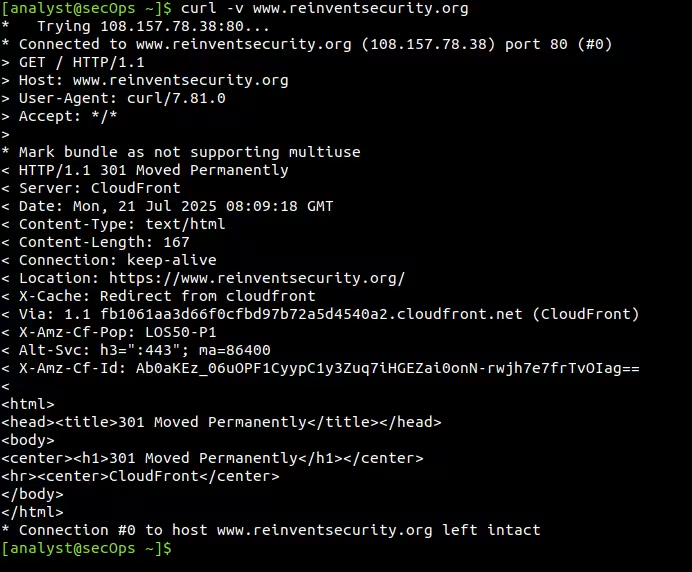
Result using Command line
Let's break down the output from the command line. However, note:
In the command output are curl's internal messages about the connection process, status update, etc.
The > (greater than) shows the data going out of the machine: HTTP requests.
While < (lesser than) represents the HTTP response headers, data flowing back to the machine.
- The curl command, when used with the flag -v (verbose), outputs all information about the client-server communication.
- From the terminal, the command tries to connect to the website using its address (108.157.78.38) under the web port 80 (that is, http). We'll explain why.
- The #0 means it is the first connection made with the server.
- Once established, the machine sends an HTTP request to the server.
- Unlike the web browser, the machine uses */* to tell the server it accepts any type of content.
- 'Mark bundle as not supporting multiuse' is the curl's way of saying it is a single connection, no plan to reuse for multiple requests.
- The server responds with the headers:
- Protocol version (HTTP/1.1)
- Status code: This is a server's way of telling the client what happened with the HTTP request. In this case, 301 means “Moved Permanently”. That is, the URL has been changed permanently. (Read more on status codes here .)
- <Server: CloudFront> explains that CloudFront is the server that responded.
- Content-Type tells us the type of content sent back by the server (text/html). While Content-Length is the size of the HTML file.
- <Location> shows us the new permanent address of the resources as redirected by the 301 status code.
Note: We can see that the scheme of the URL changes from the initial HTTP in the first line of the command to HTTPS, which is a more secure, encrypted version.
- X-Amz-CF-Pop refers to the 'Point of Presence' (location) of the specific CloudFront system handling the request.
- X-Amz-Cf-Id is Amazon CloudFront's unique identifier.
Command summary
Having tried to access http://www.reinventsecurity.org, the server returns a message to the client stating a change to the new site hosted on port 443, where the resources can be accessed.
Key Takeaway:
- By using the command curl -v www.reinventsecurity.org, we were able to see the HTTP request and response lifecycle in action.
- If the site was hosted on port 80 (HTTP), we would have read the content in plaintext.
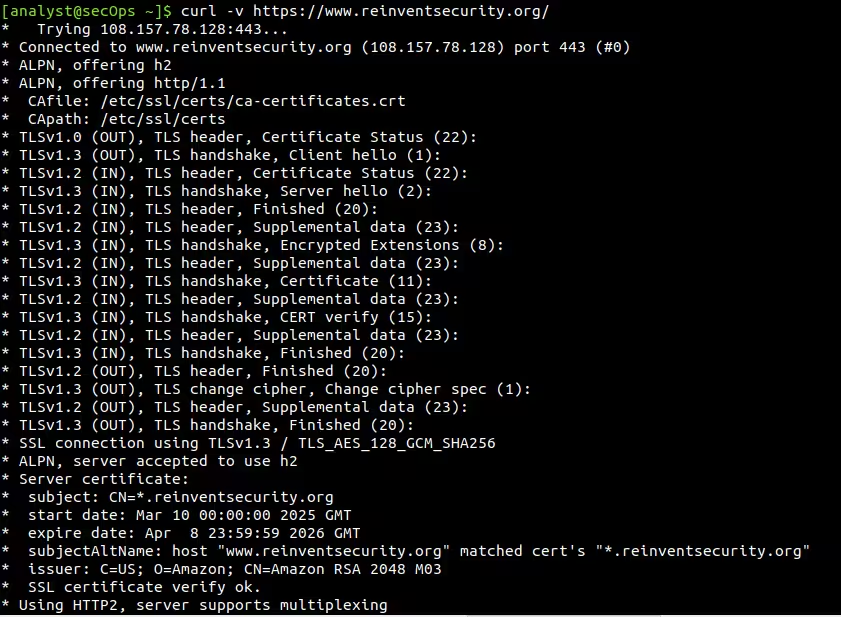
- However, with an established HTTPS connection, an extra layer of security and encryption is added through the Transport Layer Security/Secure Sockets Layer (TLS/SSL) handshake.
The command output below shows an example of an HTTPS connection:
The Statelessness of HTTP
- When a protocol is stateless, it means such a protocol does not store the state of its session or communication history.
- For HTTP, this is a core characteristic. That is, in a client-server communication, HTTP requests are handled independently and do not relate to previous or future communication exchanges.
- In summary, the server does not remember the previous request and handles it as a new entry.
Brief analogy: Explaining Stateless HTTP
Using a conversation between two people,
- If Person A asks, 'What is your Favourite Food?' and Person B replies with 'I love Beans', the dialogue is stateless. That is, no prior context is required.
- But if Person A said, 'What about you?' and Person B replies, 'I love Beans', the dialogue is stateful. It requires a state, a context built on the memory of the previous interactions or questions to understand what is asked.
- Thus, in stateless HTTP, the server does not remember any previous interaction. It takes every request as though it is a first-time conversation. Except cookies or tokens, or session IDs are used, the server barely remembers the client or relies on history of previous interactions.
- Stateless HTTP = Server doesn't rely on history. Every request must carry all the info needed for the response.
Stateless HTTP v Stateful HTTP
The diagrams below show a visual representation of how Stateless HTTP and Stateful HTTP work. To explain this, we will use a case scenario of an end user using a web browser to log in to the dashboard of the XYZ site.
Diagram 1: Stateful HTTP
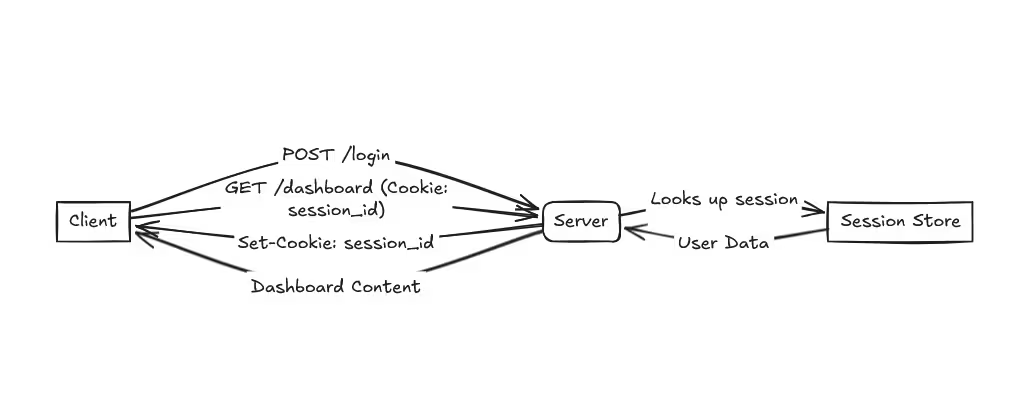
Diagram 1: Stateful HTTP
In the diagram, there are important things that can be noticed:
- The client sends an HTTP request to the server using the POST method, stating a login to the server. This request contains the username and password inputted.
- The server processes the login, verifies the personal data, and creates a session ID from the session store.
- Then, sends a HTTP response using the status code 200 OK and a Set-Cookie header that holds the session ID. Something like this:
Server response: 200 OK; Set-Cookie: session_id=abc123xyz; HttpOnly
- Client stores the Session ID cookie.
- In subsequent requests by the client (say, to render the dashboard of XYZ), it sends the GET method and includes the cookie:
GET /dashboard
Cookie:session_id=abc123xyz
- Server uses Session ID to fetch the user data from its session store and responds with the dashboard content. That is, the server remembers the client.
Diagram 2: Stateless HTTP
The stateless HTTP, as explained, the server does not retain any memory of interactions with the client.
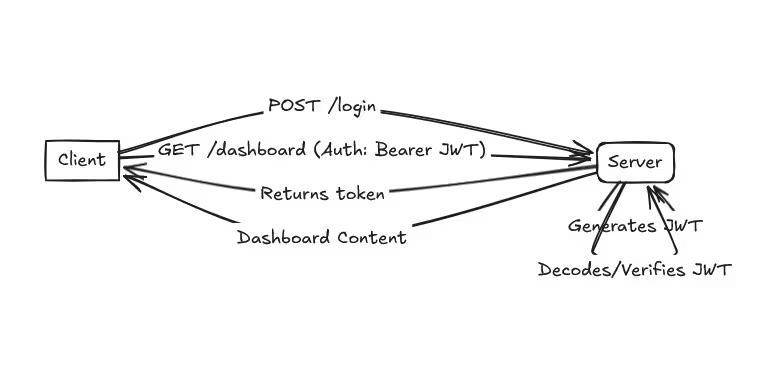
Diagram 2: Stateless HTTPP
In the diagram, we see:
- Client initiates login using POST /login, which contains the username and password to the server.
- Server processes this login and generates a JWT with the user info.
- Returns the generated token with the 200 OK status code
- Client stores the token.
- In the next client request, the authorisation header ( JWT) is included.
- Server decodes and verifies the JWT & returns dashboard content.
- No session lookup was conducted.
Key difference:
- In Stateful HTTP, the server conducts a session lookup from the session store. Then, it generates a session ID if none exist or uses any available stored session to fetch the user data or as a memory of interaction with the client.
- While Stateless HTTP does not remember the client, neither does it conduct a session lookup.
Advantages and Disadvantages of HTTP statelessness
| Advantages | Disadvantages |
|---|---|
| Scalability | No built-in session management |
| Reliability & Fault Tolerance | Requires external mechanisms for state |
| Simplicity | Increased data per request |
| Efficiency | Security considerations for stateful workarounds |
| Decoupling | Complexity in application design |
What Does a Web Server Do? (NGINX, Apache)
NGINX (pronounced 'engine-x') and Apache HTTP Server are software applications that act as web servers. The basic jobs these web servers do are:
- Listen & monitor incoming HTTP requests from clients.
- Help to interpret and locate the file requested for processing.
- Serve requested data to clients
- Implement access control, SSL/TLS encryption, and so on.
- Serves as intermediary between clients and other servers.
Why Understanding Client-Server Model Matters (for Cybersecurity Professionals)?
With cyber threats rising, malicious actors are on the lookout for exploitable vulnerabilities. For cybersecurity professionals, understanding the client-server model is fundamental for strengthening security. Some of these attacks include:
- DDOS Attacks (Distributed Denial of Service) find attackers overwhelm a server with too many requests, which shuts legitimate users from accessing the service.
In 2016, the Dyn servers were hit by the Mirai botnet, which rendered major platforms like Twitter, Netflix, CNN, the Guardian, and so on inaccessible.
- SQL Injection is an attack where the client requests are manipulated to inject malicious code into the databases of the server.
The 2017 Equifax data breach is a case in point, which details how an unpatched vulnerability was exploited.
These cases, however, raise more than ever the need for proactive, secure measures. This means organisations must work to strengthen their:
- Network security
- Ensure proper configuration of their web servers
- Use more secure protocols like HTTPS
- Undergo proper security auditing.
With this understanding of how clients and servers communicate, cybersecurity professionals and organisations alike can take steps to mitigate these cyberattacks.